
Drachmath: Solve, spell, reward
02 September 2026
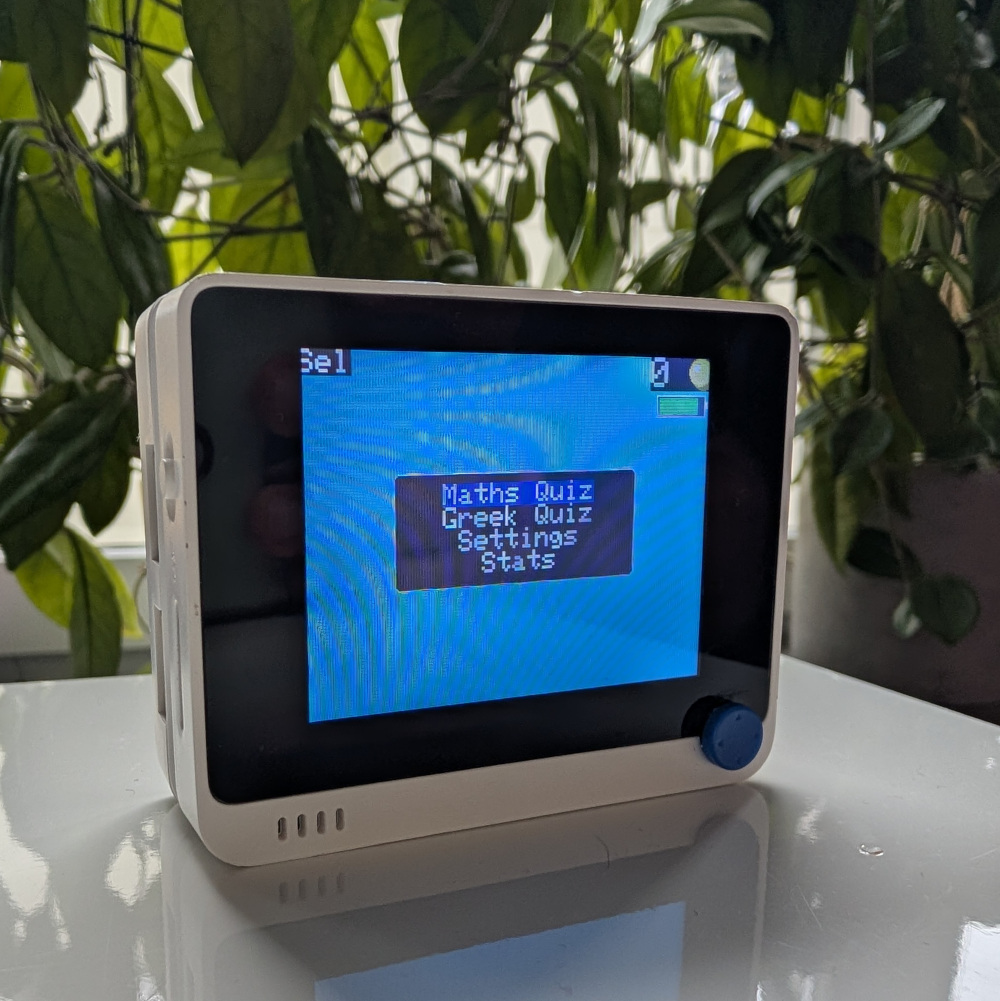
Ever heard of drachmas?
drachmath is not the old Greek currency with a… lisp (😭),
but a game that trains your kids in maths and spelling while they earn pocket money.
The concept is simple: Kids solve math and spelling problems and earn “coins” for each correct answer. When they are done, the kid shows their score and the coins are exchanged for money or other rewards by the parents. Once the “transaction” is complete, the device is reset and the game starts over again. The problems can be customized to suit the child’s learning level and are plenty to keep them busy for a while. When it comes to maths, addition, subtraction, multiplication and division problems are supported. There are spelling quizzes for both Greek and English, using a dictionary of words that is stored in a microSD card.
The inspiration for drachmath came from my own experience as a child.
My father created a similar game for me in QBasic in the 1990s.
For each correct answer I would earn, literally, a drachma.
While my motive back then was about buying candy, it gamified my learning and motivated me enough to practice in maths and spelling.
30 years later, I thought of creating a similar game but adjusted to the modern times
and how children interact with technology nowadays.
Specifically, I did not want to increase screen time for kids.
This is why drachmath is not an app you can play on your phone or computer.
drachmath runs on Seeed Studio’s Wio Terminal.
Wio Terminal is a small, portable device with a TFT screen, buttons and connectivity,
that can be programmed to run whatever you want.
drachmath should in principle work on more Arduino-compatible devices too, but you would first need to make
some slight modifications to the code.
Single-purpose devices (like Wio Terminal) can “not” be used for many things.
At least not until the kids learn how to program the Wio Terminal themselves, which is not a bad idea at all. 😂
I understand one may argue there is still a screen involved. While technically true, I believe it’s important
to distinguish between a screen that is associated with games and social media, and the specific device used as
a tool and the means to an end, i.e. earning pocket money.
No notifications or distractions with drachmath.
Software
On the technical side, drachmath is an Arduino (C++) sketch that is designed to run on Wio Terminal.
There are no dependencies on custom-made hardware or the Wio Terminal’s microcontroller, so with some modifications,
it could run on other Arduino-compatible devices too.
The main software components of drachmath are:
- drachmath.ino: The game’s transition flows and brings together the different components of the game.
- drachmath.hpp: The quiz-related logic and most platform-independent code
- Seeed Studio’s TFT_eSPI library: Used to drive the TFT screen of the Wio Terminal.
- Small patch to display smooth fonts:
needed for Greek letters to be displayed correctly. You need to apply this patch to your local installation of the
TFT_eSPIlibrary.
- Small patch to display smooth fonts:
needed for Greek letters to be displayed correctly. You need to apply this patch to your local installation of the
- Seeed Studio’s Filesystem library: Reading and writing to the SD card
- Seeed Studio’s SFUD library: Reading and writing to the SD card
While not software per se, the microSD card needs to contain the following files for the spelling quizzes to work:
Place them in the root directory of the FAT32-formatted microSD card and you are good to go. Naturally, you may use your own dictionaries and font but the format needs to match if you want to avoid modifying the code.
Hardware
Hardware-wise, three components are required if you follow my setup. Affiliate links follow:
- Wio Terminal: The “brains”
of the gadget, running the
drachmathsketch and providing the screen and buttons for user interaction. Comes equipped with many more sensors, like a microphone, buzzer, IMU, Wi-Fi and Bluetooth connectivity, etc. - Wio Terminal Chassis Battery:
What allows playing
drachmathanywhere, without the need of a power outlet. It includes aBQ27441fuel gauge to display the battery level on the screen. - A microSD card: FAT32-formatted, required for the spelling quizzes and persistently saving the settings. Any size practically works. It is not required if you only want to play the math quiz and do not care about saving the settings.
Main menu
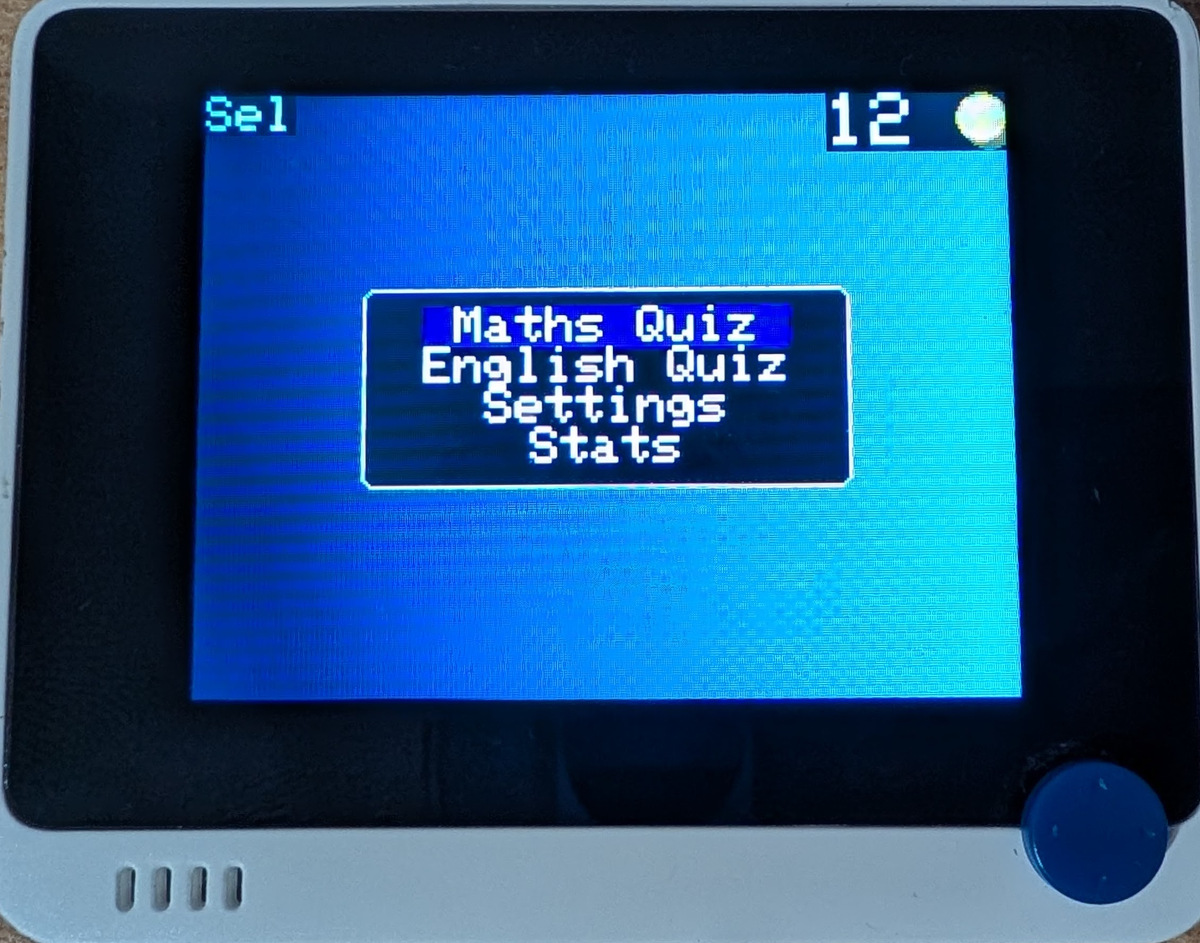
The main menu is the first thing the user sees after powering on the device.
Different choices may be selected by using Wio Terminal’s 5-way joystick.
You can select a choice by either pressing the joystick down or the leftmost button (Sel),
located on the upper side of the device.
Depending on which spelling quiz is currently selected in settings, the user will either
see “Greek Quiz” or “English Quiz” as the second entry of the menu.
The score, technically not part of the main menu, is always visible on the top right corner of the screen.
Under it, you may see the battery indicator if you are using the Wio Terminal Chassis Battery which includes
a BQ27441 fuel gauge.
Math quiz
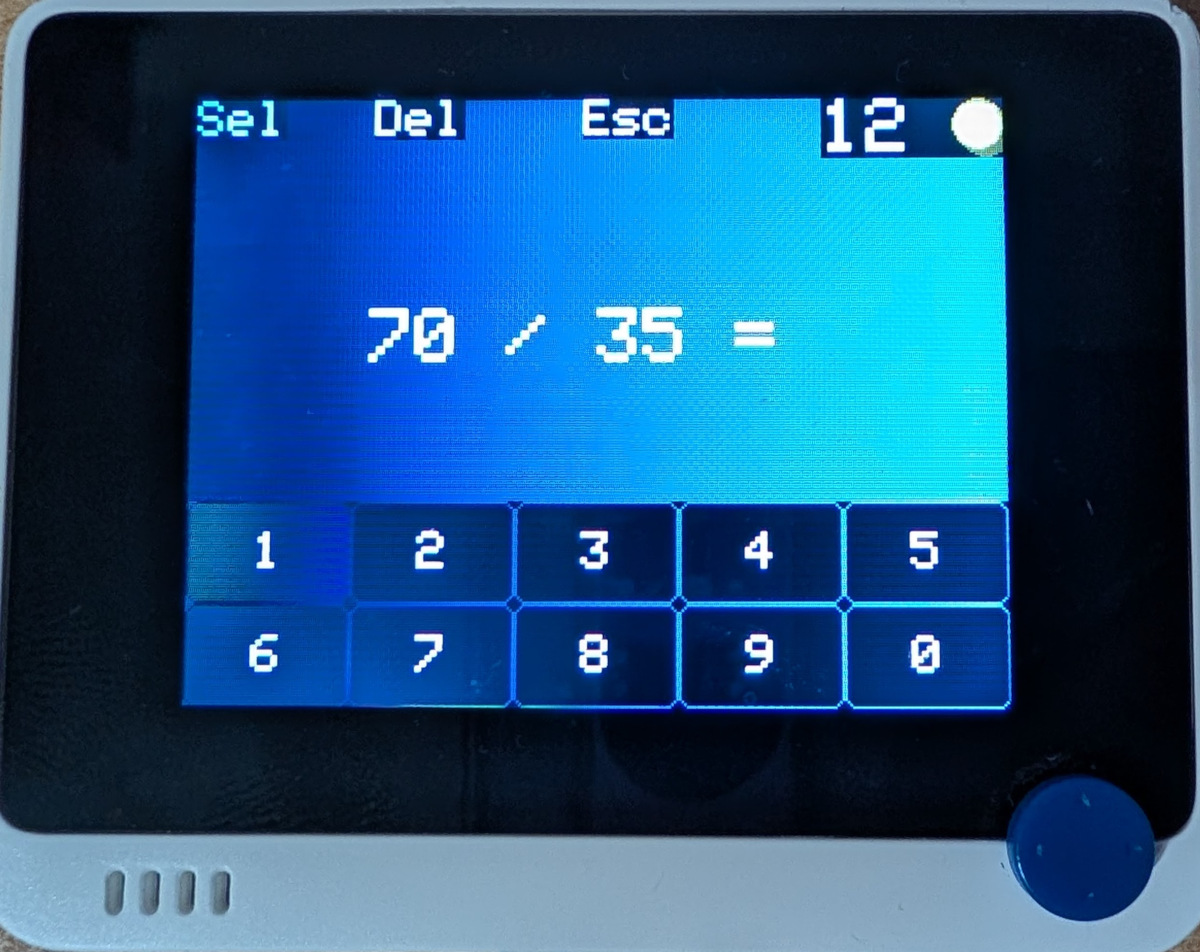
The math quiz is the first choice of the main menu and coincidentally the first quiz I implemented. The user is presented with a math problem and a numerical keyboard to enter their answer. Addition, subtraction, multiplication and division problems are supported. Currently the answer is always the result of a single operation between two numbers. All divisions are perfect, meaning the result is always an integer.
To answer the quiz, use the joystick to select a number and then press the joystick down to enter it.
You may add up to 4 digits to your answer. If you make a mistake, you can delete the last digit by pressing
the middle button, located on the top of the device.
It is labeled Del on the screen.
Once you are done, press the leftmost button (Sel) to submit your answer.
To exit the quiz, press the right button (Esc) and you will end up back in the main menu.
Your current score is displayed on the top right corner, next to the coin icon and over the battery indicator, if you are using the Wio Terminal Chassis Battery. Your score is incremented by 1 for each correct answer. Currently, there is no penalty for incorrect answers, but this may change in the future or be configurable in settings. The score is not reset when you exit the quiz and is kept until the device is reset or powered off.
You may select the difficult of the problems in settings. Specifically, you can choose the range of the operands used in the problems, the range of the result as well as the types of operations (addition, subtraction, multiplication and division) to use for the problems. By default, the max operand and result are both set to 10 and the only operation is addition, so you may want to make things more challenging.
Spelling quizzes (Greek and English)
The spelling quizzes are the second choice of the main menu and are available in Greek and English, with the default being Greek.
They are the most “intricate” part code-wise and use two different approaches to generate the problems.
In both quizzes, the user is presented a word with some missing letters without it being obvious how many letters are missing.
This is by design, as revealing the number of missing letters could reveal the answer, especially in Greek.
Both quizzes use some kind of dictionary of words stored in a microSD card to generate the problems.
In other words, a microSD card is required for the spelling quizzes to work, unlike the math quiz.
The controls for the spelling quizzes are similar to the math quiz.
The joystick is used to navigate the keyboard and choose letters. Sel is used to provide the answer and
Del to delete the last letter. To exit the quiz and return to the main menu, press the Esc button.
The Greek quiz allows up to 2 missing letters, while the English up to 4.
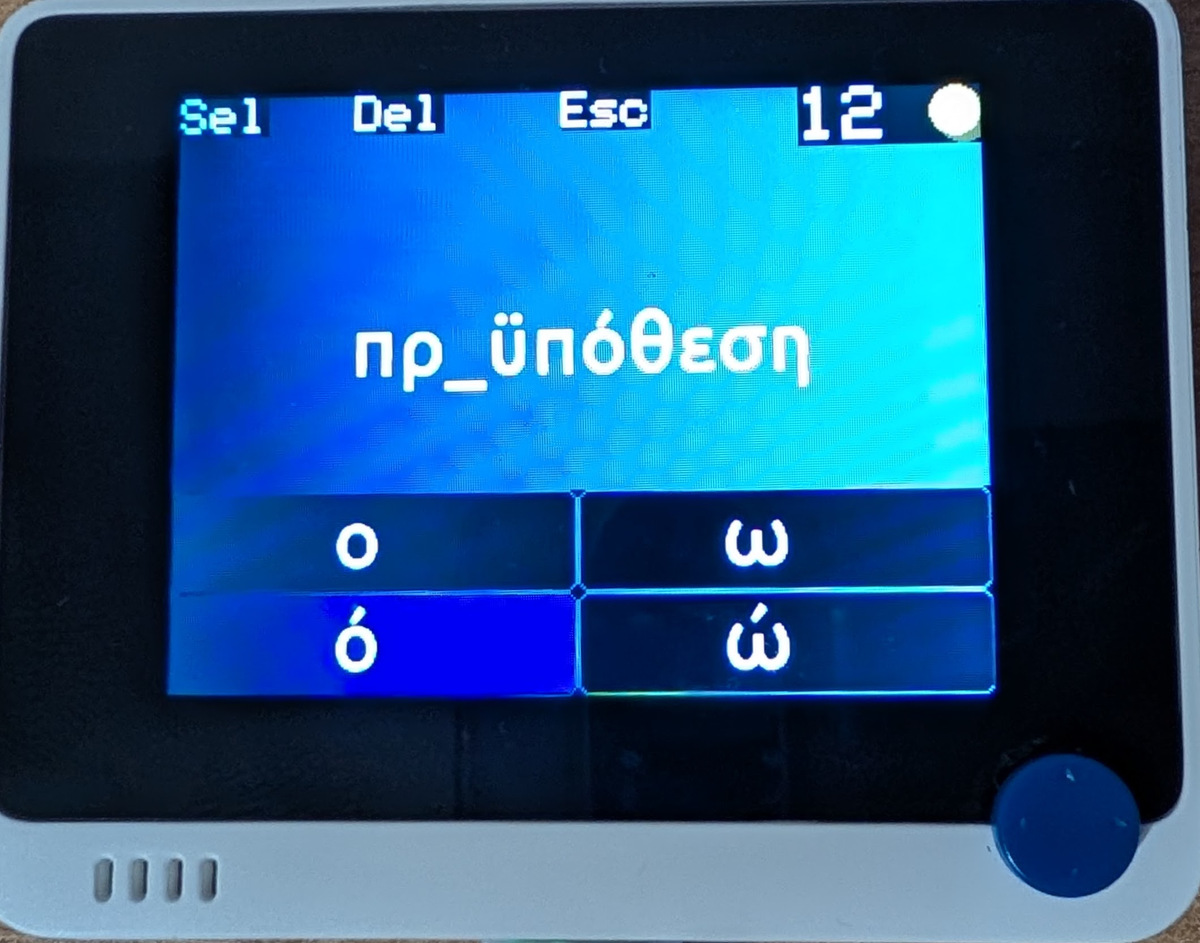
The Greek quiz uses a dictionary of words stored in a greek_words.txt file on the microSD card.
Generating the problems was surprisingly easier compared to the English quiz.
This is because Greek has a lot of homophones, i.e. letters or combinations of letters (diphthongs) that sound the same.
Whenever there’s an iota sound (like ee in see) in a Greek word, there are the following plausible ways to spell it: ι, η,
ει, οι, υ. For example, my name, Δημήτρης, contains three iota sounds which could be spelled in 5 different ways
and still pronounced the same way in modern Greek.
Additionally, for the most part, there aren’t many Greek words that sound the same but are spelled differently, unlike English.
This means that it is typically enough to present a word without any context for the user to be able to pick the right spelling.
Once a word is picked from the dictionary and the letters to be removed are selected, the user is presented with a keyboard
of plausible phonetic alternatives for the missing letters.
Any of the alternatives will produce the same pronunciation of the word, but only one is correct. The following enum gives
you an idea of the different problems (and alternatives) generated for the Greek quiz:
enum class GreekHomophoneGroup : uint8_t
{
    None,
    EpsilonSound, // ε, αι
    IotaSound,    // ι, η, υ, ει, οι
    OmicronSound, // ο, ω
    AvSound,      // αυ, αβ, αφ
    EvSound,      // ευ, εβ, εφ
    GammaNasal    // γγ, γκ
};
The Greek spelling problems are focused mostly on vowels and dipthongs since they are the biggest source of confusion and mistakes.
This means you should never get a problem where an alpha is missing, since there is only one way to spell it.
The same goes for most consonants, except for the ones part of the GreekHomophoneGroup enum above.
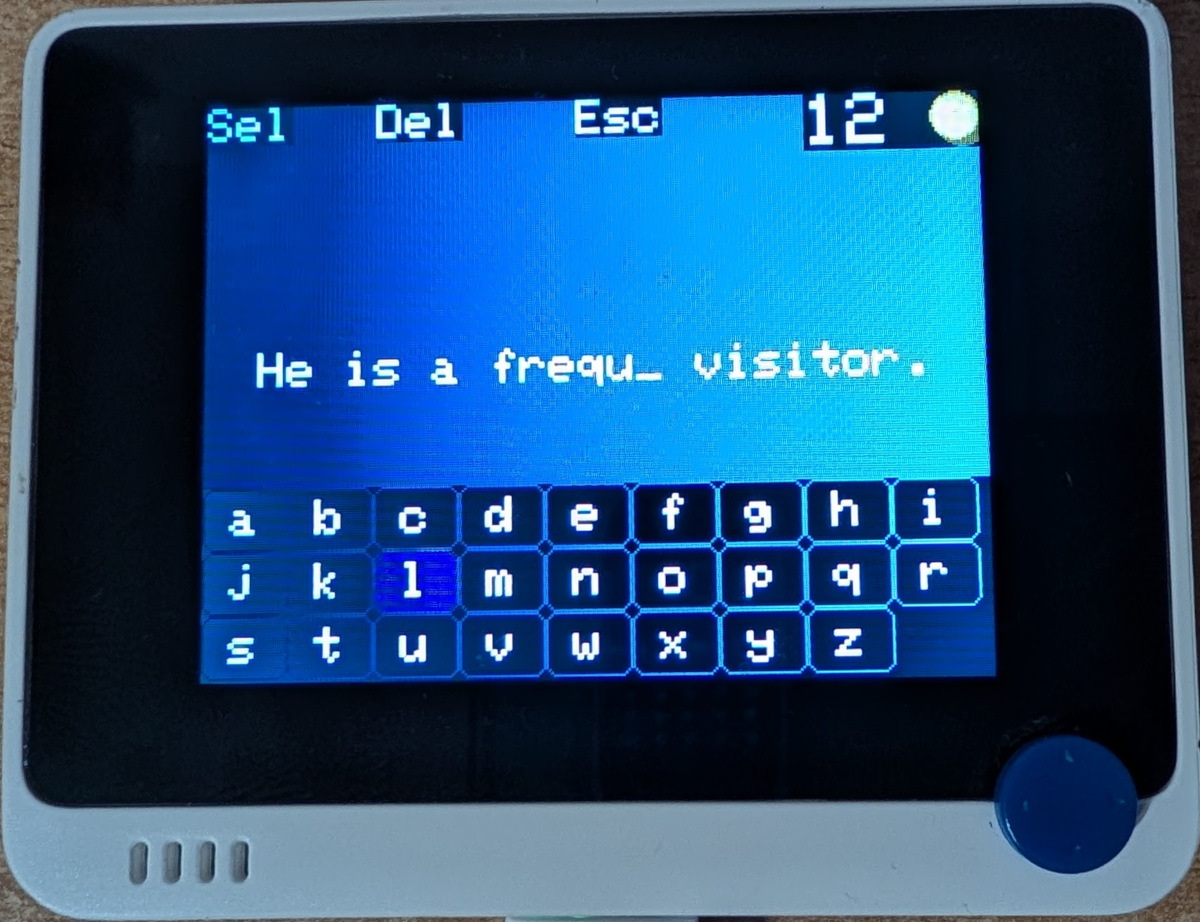
Creating the English quiz was a whole different story.
I had to “consult” an LLM for the English spelling quiz since it was way harder than I originally anticipated and I am not a linguist.
While English has a lot of homophones, there is no obvious way to identify them without referring to a phonetic dictionary.
To sum it up without going into details (not a linguist, remember?), the same letters are pronounced differently in different
words. Moreover, the same sound may be spelled differently in different words.
This makes it difficult to follow the same approach as the Greek quiz, where a list of plausible alternatives can be generated on the fly.
Additionally, there are many English words that sound almost the same but have different spellings, e.g. meat and meet.
This means that even if we came up with a list of alternative choices, there may be multiple correct answers,
like with the meat and meet example above.
In other words, we have two issues: (a) generating a list of reasonable alternatives for the missing letters, (b) eliminating
ambiguity so there is only one correct answer.
To work around the non-trivial issue of presenting different keyboards for different problems,
the entire alphabet is presented to the user as a keyboard.
As for the ambiguity issue, we present a sentence containing the problem-word with the missing letters.
This means the English dictionary (english_words.txt) does not only contain the words themselves, but also
a sentence that uses the word in question.
When it comes to problems, we use unstressed endings and tricky letter clusters that can be found in the beginning, the middle or the end of a word. You can get an idea of the problem candidates by looking at the following snippet:
/// Unstressed endings
constexpr const char* const suffixes[]
    = {"tion", "sion", "cian", "ance", "ence", "able", "ible", "ious", "ary",
       "ery",  "ory",  "ous",  "ant",  "ent",  "ure",  "age",  "ice",  "ise",
       "ive",  "ine",  "ite",  "ate",  "ar",   "er",   "or",   "ur",   "le",
       "el",   "al",   "il",   "en",   "on",   "an",   "in",   "un",   "em",
       "om",   "um",   "am",   "et",   "it",   "ot",   "ut"};

/// Silent letters at the start of a word
constexpr const char* const initialClusters[]
    = {"kn", "wr", "gn", "ps", "rh", "wh"};

/// Endings not spelled the way they sound
constexpr const char* const finalClusters[]
    = {"stle", "tch", "dge", "mb", "gh", "ck", "lk", "lf"};

/// Tricky clusters anywhere in a word
constexpr const char* const clusters[] = {"ough",
                                          "augh",
                                          "igh",
                                          "ph",
                                          "ch",
                                          "sc",
                                          "ay",
                                          "ey",
                                          "oy",
                                          "aw",
                                          "ew",
                                          "ow",
                                          "ar",
                                          "er",
                                          "ir",
                                          "or",
                                          "ur"};
Settings
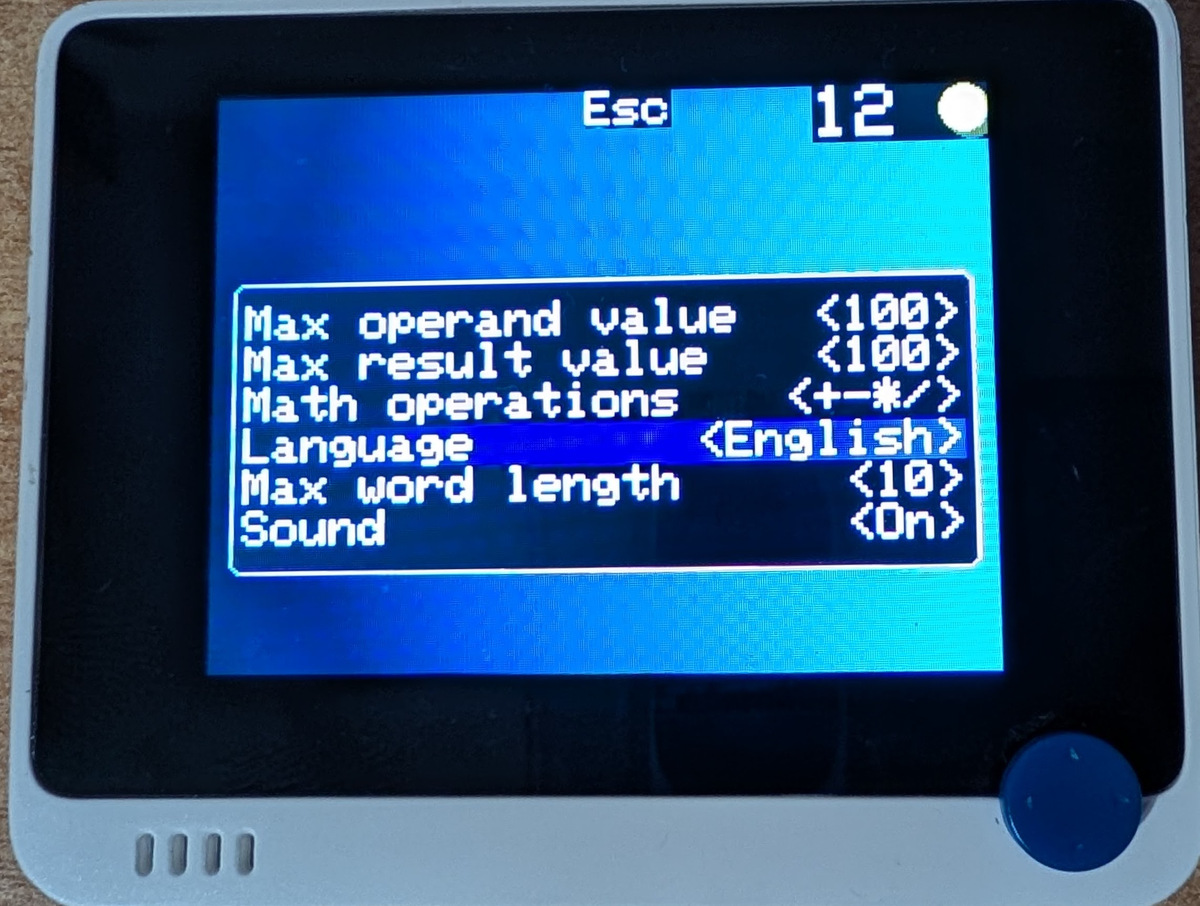
Settings are reachable from the main menu and mainly allow changing the difficulty of the problems for both quizzes.
Specifically, for the math quiz, you can change the range of the operands and the result, as well as how many different
operations used in the problems.
For the spelling quizzes, you can choose how long the words should be.
Moreover, you can select the language of the spelling quiz and whether to have the buzzer play sounds, e.g. when an
answer is correct or incorrect.
The settings are saved persistently if a microSD card is present, so they will be around the next time the device is powered on.
Last but not least, you can lock the settings by placing a file named lock_settings.txt in the root directory of the microSD card.
The first line of the file should contain 1 to lock the settings, or anything else to leave them unlocked.
This way, you can be sure your kids are solving problems at the intended difficulty level.
Stats
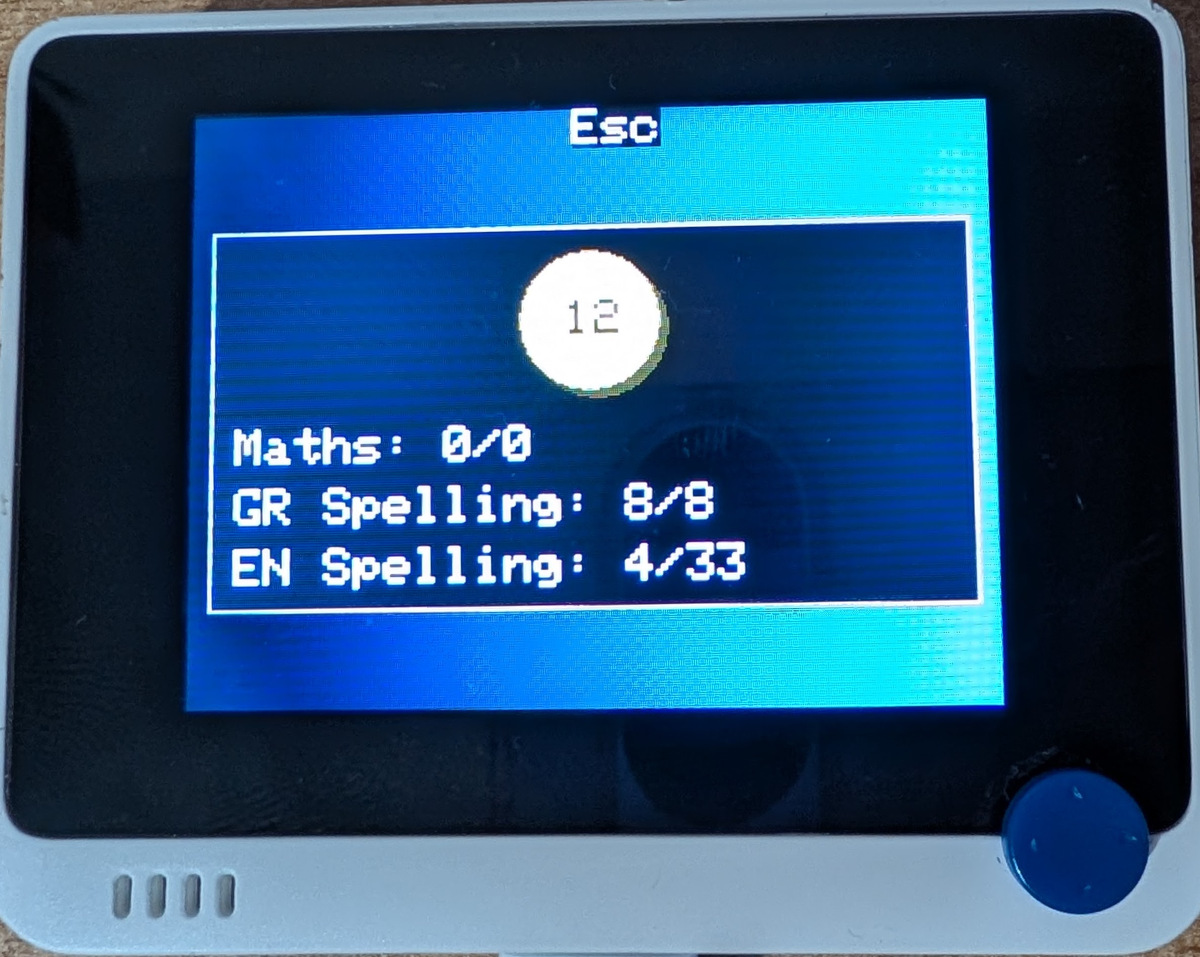
In the stats screen you can view your achievements. A retro-inspired animation and sound effect displays your current score. Kids really like this part. For each quiz, the correct vs total attempts are displayed. That way you can see how well your kids are doing. As previously mentioned, the incorrect attempts are not currently penalized, but if you think this should become configurable, let me know.
Conclusion
This was a fun summer project which gave me to chance to create something useful but also to experiment with C++.
Particularly, I got the chance to over-engineer parts of the code to make it more “generic” and “reusable”,
even though I understand it is very unlikely the same code will be used in another project or platform.
Needless to say but I have new respect for GUI frameworks, especially the embedded ones
and the amount of architectural work that goes into them.
In the end, parts of the code became heavily templated and the Standard Library was avoided to make the project
code easier to port to other Arduino-compatible devices with more limited resources.
That being said, it looked like Wio Terminal supported quite a lot of STL,
but the default configuration used the C++14 standard which was admittedly annoying.
It will not surprise me if there is indeed compiler support for C++17 or later standards,
but I wanted to keep things simple
and easily reproducible for anyone with an standard Arduino IDE installation.
You can find all resources to build your own drachmath device at
platisd/drachmath.
